Gathering user input
This is one of the most important features of ETS2LA, and it's also the one that you must use instead of 3rd party libraries. ETS2LA provides a built in way to gather user input, and it's the only way that is guaranteed to work across all plugins, features and platforms. We handle the transitions between Linux and Windows, use our API or be square!
Limitations of ETS2LA's input system.
- All Linux distributions might not support keyboard inputs. Linux is much more secretive with keyboard inputs than Windows (this is good) and due to it, especially in Wayland environments, ETS2LA cannot guarantee that the operating system will pass us the keyboard. We provide a notification to users about this, and they must bind their inputs to a gamepad instead.
- Not all buttons are supported on all controllers. We use standard input frameworks on both Windows and Linux (DX11/SDL2), despite this we might not correctly detect and read all buttons and axes on all controllers. We do our best, but this is just a limitation we have to live with.
If you want to help iron out these features, you can check out the code on GitHub and see if you can find any issues or improvements. We're always happy to receive contributions!
How to register a button or axis input.
ETS2LA provides a ControlsBackend class that works across all platforms and controllers. This class allows you to .RegisterControls and then listen to them via events. To register a control you first need a ControlDefinition object. Below is an example of one, you can find more examples in the codebase.
using ETS2LA.Controls;

public ControlDefinition ExampleControl = new ControlDefinition
{
    Id = "ExampleConsumer.ExampleControl", // Never change this ID once set!
    Name = "Example Control",
    Description = "An example control that outputs a float value.",
    DefaultKeybind = "K", // You can set any keyboard key(!) here, leaving as
                          // blank will make it unbound by default.
    Type = ControlType.Float // ControlType.Boolean is also available, note that keys and buttons can be
                             // bound to ControlType.Float as well, giving a value of 0.0f or 1.0f.
                             // Similarly axes can be bound to ControlType.Boolean, returning
                             // true/false values based on a threshold of 0.5f.
};
This control can then be registered in your plugin's Init() function like so:
public override void Init()
{
    base.Init();
    ControlsBackend.Current.RegisterControl(ExampleControl);
}
Note that if a control isn't registered, it doesn't show up in the keybind menu even if there's an existing keybind for it. This is useful if you want to gate some controls behind certain features, but it also means that you have to be careful to register your controls before users start trying to bind them.
How to listen to registered controls.
Listening to controls works as you'd expect. We decided to not use the event system for this, and instead provide a callback directly in ControlsBackend.
// Anywhere in code, after the control has been registered.
// Usually this is after .RegisterControl in Init, but you don't have to listen
// to registered controls immediately.
ControlsBackend.Current.On(ExampleControl.Id, OnExampleControlChanged);

private void OnExampleControlChanged(object sender, ControlChangeEventArgs e)
{
    float value = (float)e.NewValue; // Remember to cast to your type  (return is of type `object`)
}
ETS2LA also provides some built in controls that you can listen to without registering. These are mostly related to assist features and UI navigation. These controls are as follows:
- SET - Works like the
SETkey in real vehicles. Acts as theOkbutton when any dialogs are pending confirmation. The user can change this behaviour withETS2LA.Settings.Global.AssistanceSettings.SetSpeedBehaviourOption. - Next - Cycles to the next element in whatever UI needs it. Additionally acts as the
Cancelbutton when any dialogs are pending confirmation. - Assist - Toggles additional assists on or off, this is usually the lane assist. Should not update current speed. That is done using the SET key.
- Increase - Increases the current speed by a certain amount. Acts as the
Upbutton when any dialogs are pending confirmation, or a UI element is focused. - Decrease - Decreases the current speed by a certain amount. Acts as the
Downbutton when any dialogs are pending confirmation, or a UI element is focused.
These can be listened to just like any other control, except you need to use their IDs from ControlsBackend.Defaults.NAME.ID. For example ControlsBackend.Defaults.SET.Id for the SET control.
Usually Increase and Decrease are used to reset back to an existing ACC value, while SET enables / disables the ACC entirely. This is slightly different than in real life, where SET is not used to disable ACC, but this is done to fix some of ETS2LA's limitations. Mainly while the ACC is enabled, a user cannot press the accelerator or brake pedals. Here's an example:
- User is driving at 80 km/h, presses
SETto enable ACC, ETS2LA sets the speed to 80 km/h. - User wants to speed up, they press
Increaseonce, and ETS2LA increases the speed to 81 km/h. - User wants to pause ACC, they press
SETagain, and now they can use the accelerator and brake pedals. - User wants to resume ACC, they press
IncreaseorDecreaseonce, and now the speed is set back to 81 km/h. If the user pressedSETinstead, the speed would be set to the current speed of the truck, which could be different than 81 km/h. - At any time, the user could press
Assistto toggle the lane assist on or off, without affecting ACC at all.
Here's an illustration of what ideal layouts could look like, most likely users can't achieve this, and that's fine, as long as they can bind the controls to something they like.
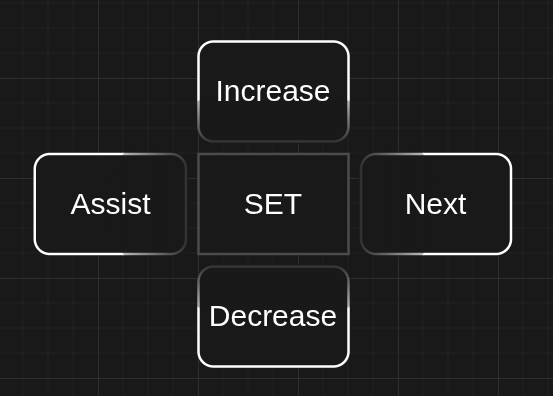
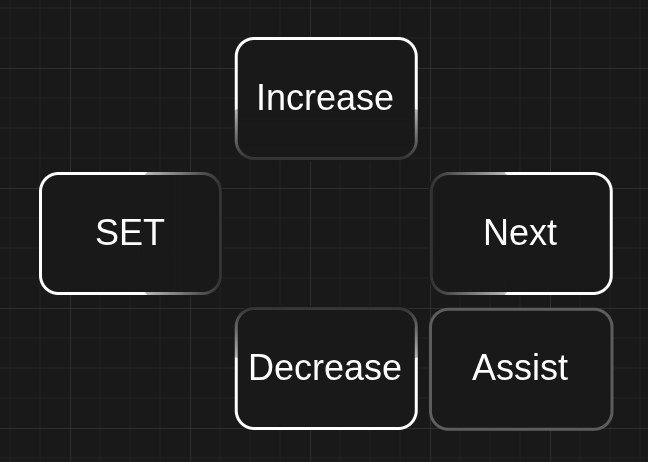
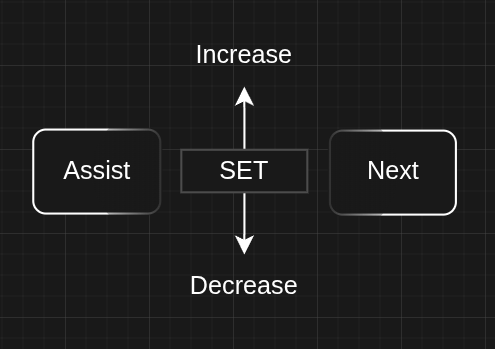
ETS2LA does not yet have a dashboard, and thus NEXT is not used for anything, this will come later on where you need to check some variable in your callbacks to make sure ETS2LA is not currently controlling a UI element. For example if the user is currently trying to confirm a dialog, you don't want SET to toggle ACC, but instead confirm the dialog. ETS2LA will handle any panics that could arise from this, so you just have to check a variable.