ETS2LA C# Devblog for April
Posted by:
This month we made some progress towards actual self driving. We now have a very WIP initial proof of concept for a lane assist plugin. I have had to take it slow this month, as University has continued to be busy.
Release Schedule
We still plan to release this half of the year, however at this point I have lost around a month and a half due to University. Time is ticking and I don't want to rush the release, so if we don't think it's ready by the end of June then we'll likely push it back a month or two. The beta program will be opened this half of the year, so anyone that wants to try out C#, regardless of if we manage to get it done in time, will be able to do so.
First steps into self driving
A major departure from the previous ETS2LA versions, is that with the release of C#, we will no longer need to use pre-extracted data. This is made possible by sk-zk's amazing work on TruckLib, which allows us to read game data for your specific game version and mods.
Most of my time over the past month has been going into making sense of all the data TruckLib provides. I've built wrappers around that data to make it more convenient for ETS2LA to use, and I've started working on initial proof of concept plugins that use this data. The first of these plugins is a basic lane keeping plugin, which I managed to get working in just a few hours. I've attached a video of it in action below.
Initial LKAS Plugin running in ETS2LA in Linux
I'm slowly adding more features to this initial plugin, and I'm looking for pieces of code I can extract into functions in the ETS2LA codebase. Remember that this plugin will be closed source, and as such you won't see the code for it. This is why I want to extract most of the "basic" functions into the main codebase, so 3rd party developers don't have to go through a long process.
I honestly would've hoped I was further along in terms of self-driving by now, but I am hopeful due to the ease of implementing this initial version. Doing even this much in the current Python version would take thousands of lines of code, and even the current version is already more accurate. I'll keep you updated on the progress next month!
Control Scheme
Something else I've been working on is the new control scheme for ETS2LA. This time, instead of having all plugins implement their own controls, ETS2LA will have a central ApplicationState class that handles the most common actions. This allows us to have consistent controls across different plugins, and it makes it easier for 3rd parties to hop onboard.
Tip: Check the above video again, the state is visible in one of the windows!
I took some time to figure out the control scheme for this ApplicationState, and I think I've come up with something pretty good. I took inspiration from how ACC and LKAS are done in my IRL car, and adapted the logic to work in ETS2LA. Describing the controls are a bit difficult, so instead I'll give you this "user flow" of how they work:
- User is driving at 80 km/h, presses
SETto enable ACC, ETS2LA sets the speed to 80 km/h. - User wants to speed up, they press
Increaseonce, and ETS2LA increases the speed to 81 km/h. - User wants to pause ACC, they press
SETagain, and now they can use the accelerator and brake pedals.
NOTE: Differs from real cars, where this would be done by pressing the brake pedal. ETS2LA cannot detect this, so we use theSETbutton instead. - User wants to resume ACC, they press
IncreaseorDecreaseonce, and now the speed is set back to 81 km/h. If the user pressedSETinstead, the speed would be set to the current speed of the truck, which could be different than 81 km/h. - At any time, the user could press
Assistto toggle between different levels of lane assist.
NOTE: For safety, disabling ACC viaSETwill also disable the lane assist, but enabling it again will not re-enable the lane assist.
Visually here are some ideas on how to bind this to controllers. The default binds are your arrow keys, but you can obviously change these to whatever you want. On controllers the D-Pad could be good, and on wheels whatever buttons you have available.


Possible Controller Bindings
The middle layout here is similar to how the arrow keys would work, where one of the buttons has to be bound outside of the arrows. This is also how it would look on a D-Pad. The NEXT button is used for UI interactions, the other buttons will also change their behaviour depending on if you're interacting with UI or not.
Heads Up Display (HUD)
I've also been working on finding some inspiration for how ETS2LA's new HUD will look like. The improvements over Python don't stop at styling, but without any concrete examples of working software, I don't want to promise too much. As such I will just gather some examples of HUDs that I plan to take inspiration from.
If you have any feedback on the examples, or have others I might have missed, then please send your feedback on the Discord server. Everything about the styling and features is up in the air, and if you want something included, now is the best time to speak up!
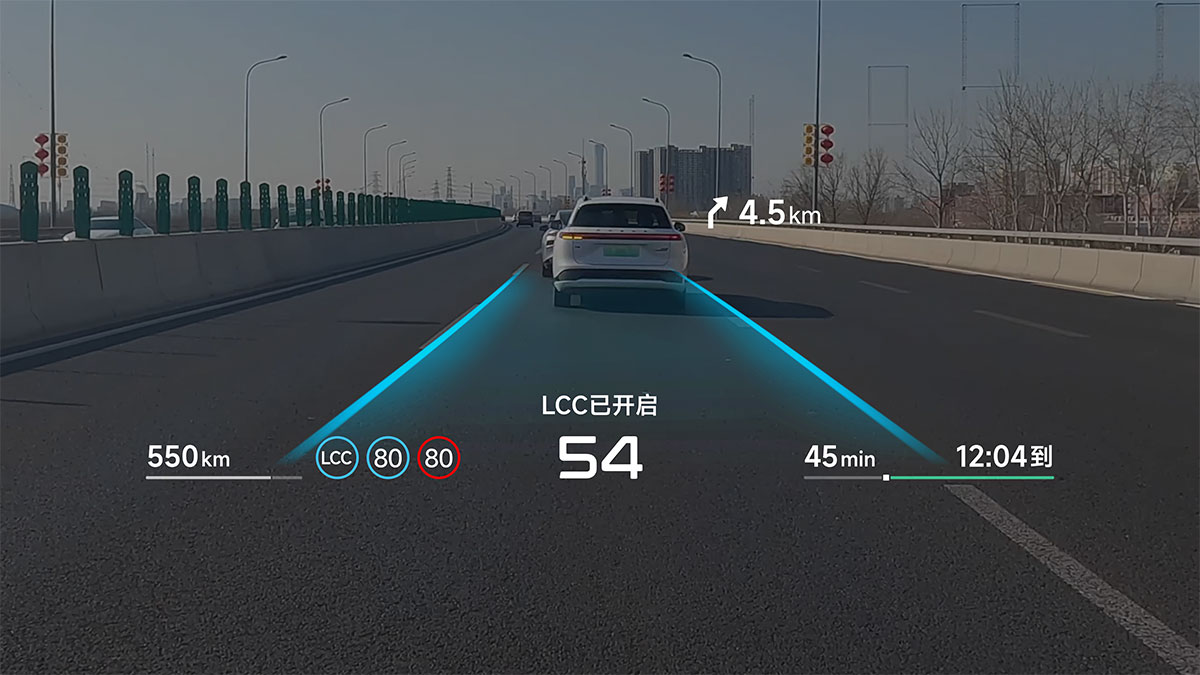
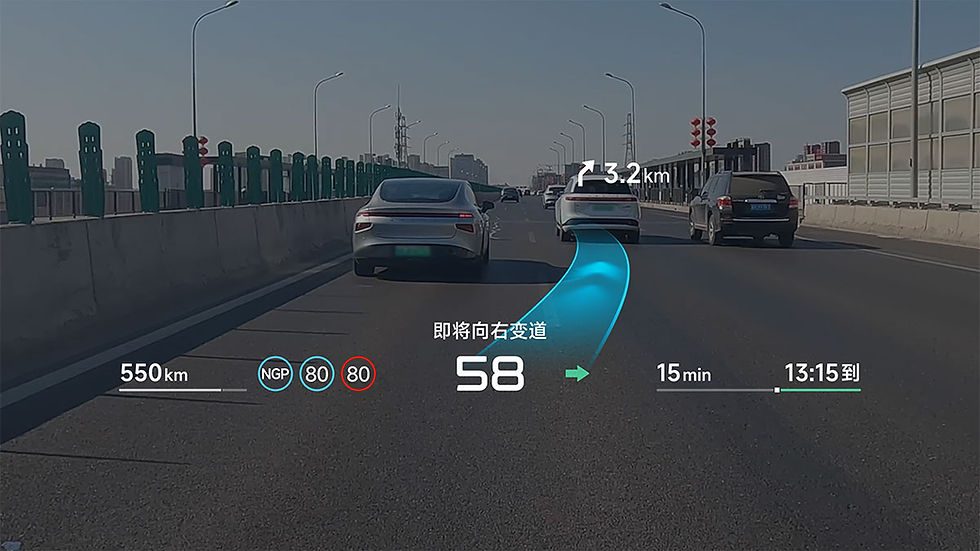
XPeng's latest AR-HUD
In my opinion the best styling out of any HUD currently available is from XPeng. Ideally this is the direction I want ETS2LA's HUD to take. Now that ETS2LA will also have seperate LKAS and self driving systems, I feel like adding status indicators and immediately noticeable visual cues will help users.
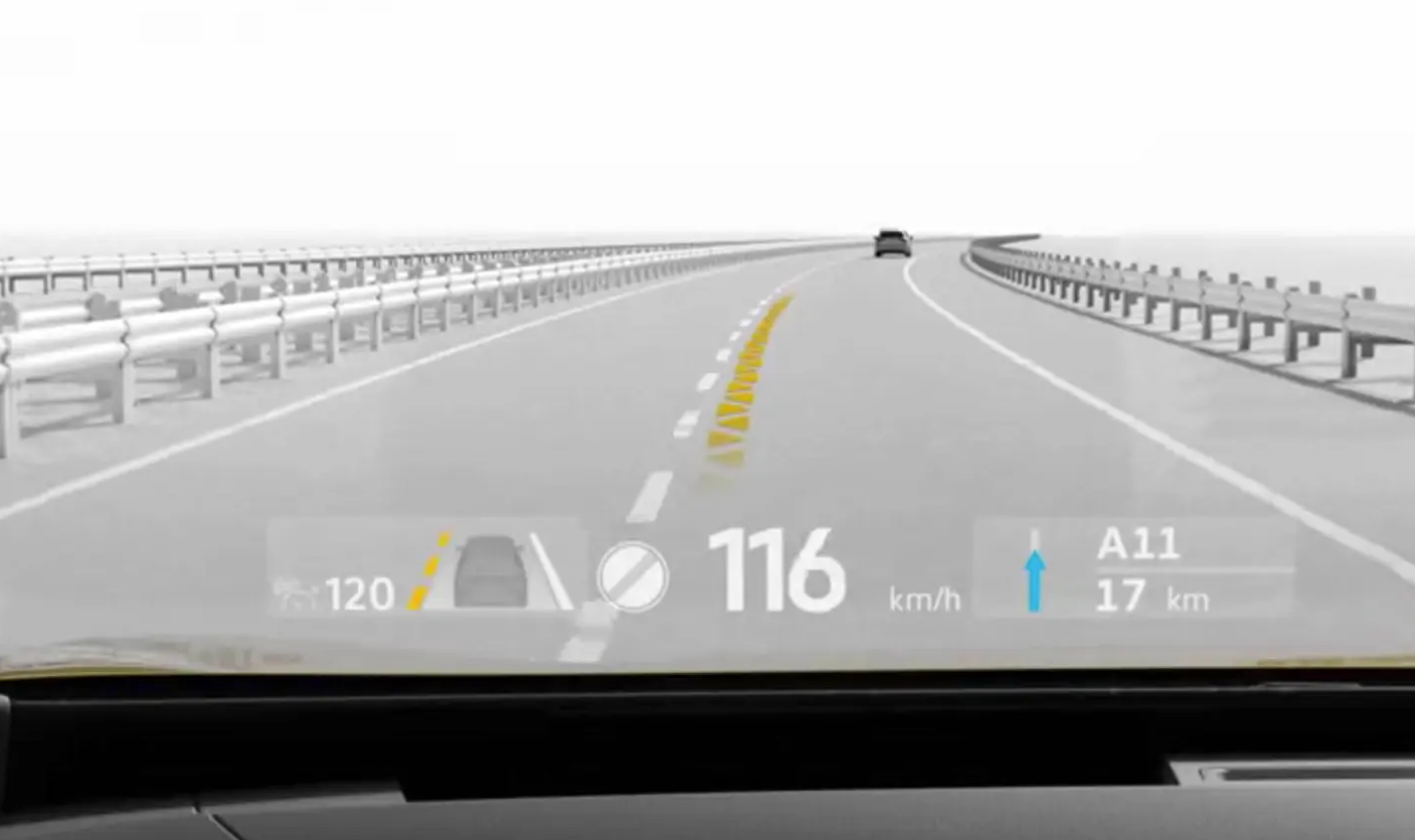
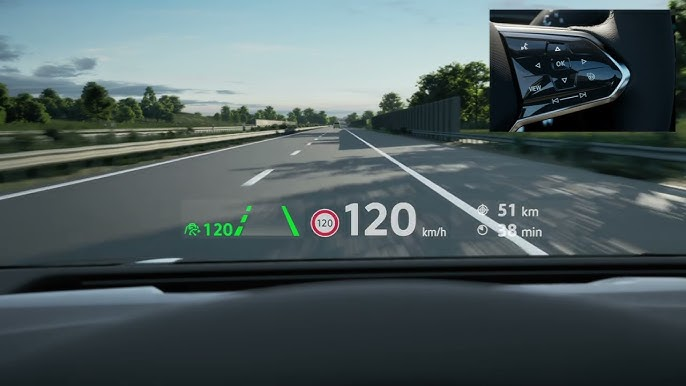
Volkswagen's HUD
ETS2LA does need a lot of information visible, and our users have liked how many elements the current HUD systems has. And as such I think we'll implement something similar to VW's HUDs, which have elements on the left and right you can change between different information. This allows us to have a lot of information, at least two layers deep.
This is all just a concept at this stage, but I hope you're just as excited as I am for the new HUD. It will be a huge improvement over the existing one, and it should allow us to display a lot more information in a more intuitive way. It will also make it possible for you to change settings without having to alt tab out of the game, which is a huge QoL improvement!
Community Highlight
This month I didn't receive any special community creations, and as such I want to highlight some of the people we're working with to build ETS2LA. These people are the reason ETS2LA is possible, just keep in mind that our development team is even larger than this, and those not mentioned here are often just as important!
truckermudgeon/tmudge - Is the creator of maps (GitHub), the project we use for the map inside of ETS2LA. This repository is also used to extract our map data, although that part won't be relevant for C#.
dariowouters/roccovax - Handles all our SDK development. Without him ETS2LA would not be close to where it's at right now. Roccovax is the reason we have vehicles, navigation, and traffic light information directly from the game without any vision or other AI models.
Glas42 - Is the creator of ETS2LA's AR implementation. Glas spent hours figuring out all of the maths required for projecting information into the game world through and external overlay. Glas also has an important spot in the core dev team, where I work with him on "official" matters regularly.
sk-zk - As earlier mentioned sk-zk is instrumental for the C# release, without TruckLib we would not be able to read game data directly, and many of the improvements we're seeing are directly related to the work he's done in creating and maintaining the library.
goodnightan/晚安 - Maintains ETS2LA's mainland China servers and translates these blog posts into Chinese. He has spent considerable time and effort into making sure that the Chinese community can enjoy ETS2LA as well as we here in the west, and as such his impact on ETS2LA as a whole cannot be understated.
These are just some of the important people in the community. There are way, way more that I don't have the "time" to mention, but just know that this isn't a solo project anymore! There are 10s of people pouring their time and resources into making ETS2LA the best it can be, and I'm so grateful for all of them.
Thanks for reading!
If you're interested in what the code looks like (maybe you could create C# plugins in the future!), then check out the Documentation for some code snippets and explanations. It's still being worked on, but it should give you a good idea of what to expect.
We're welcoming all C# developers with open arms, my experience is mostly limited to Unity, and as such I'm having to learn how to do things the "right way" as I go. Please just keep in mind that we don't allow agentic AI in our codebase, we value the effort of individual people over the apparent "efficiency" of AI.